
Best Export Documentation Software for Small Exporters
Short answer: if you make 10 documents a month or fewer, IncoDocs Free costs nothing. Above that, ovrseas ($20 a month with unlimited documents, or $15 for a single week) and IncoDocs Basic ($27 to $33 a month for 30 documents) both cover clean, matching export documents. If you must file EEI in AES yourself, or screen every buyer against restricted-party lists, pick a compliance suite such as Shipping Solutions or Descartes. The table below puts prices and limits side by side, read from each vendor's own site on 12 October 2026.
We make ovrseas, one of the tools on this page. So we kept to facts each vendor publishes, and we say where the others are the better pick.
What is export documentation software?
It is a tool where you enter a shipment once, and it fills in the papers that shipment needs: commercial invoice, packing list, certificate of origin, bill of lading and more. The point is not nicer templates. The point is that the same number cannot differ between two documents. When an invoice and a packing list disagree, customs can hold the container, and a bank can refuse to pay under a letter of credit.
It is not the same as shipping software. Booking, freight rates and container tracking are different jobs. Some platforms do them all. A document tool does the paperwork only.
How do the main tools compare?
| Tool | Price | Runs on | Files EEI in AES | Users | Best for |
|---|---|---|---|---|---|
| ovrseas | $15 for one week (one payment), $20 a month, or $192 a year. Unlimited documents. 14-day trial, no card. | Web browser | No | 1 login per account | Occasional shippers who want to pay for one week, and exporters who want unlimited documents for $20 a month |
| IncoDocs | Free plan (10 documents a month). Basic $27 and Professional $62 a month billed yearly ($33 and $83 month to month) for 30 and 100 documents. Organization $167 a month for 300 documents, billed yearly only. 14-day trial on paid plans. | Web | Not stated | 1 to 5; unlimited on Organization Plus | Small teams that want a free start or many templates |
| Cargoflip | $99 a month (Individual, 100 documents) or $299 a month (Teams, unlimited documents). Enterprise by quote. | Web | Not stated | 1 on Individual; Teams says 3 included (its compare table says 2) | Teams that also want tracking (a paid add-on) and landed-cost analysis |
| Shipping Solutions | $1,199 (Classic) or $2,999 (Professional) one time, with the first year of support included, then from $300 a year. Enterprise $9,999 a year. Free demo. | Windows desktop | Yes | 1 included; extra $600 (Classic) or $1,500 (Professional); unlimited on Enterprise | US exporters who file their own EEI (Professional and Enterprise add restricted-party screening) |
| Descartes Export Documentation Manager | Quote only | Not stated | Yes | Role-based access | Larger exporters that need full compliance checks |
| Just Trade (UK) | £2,000 a year for the first user, £395 for each extra user | Web browser | Not stated (a UK product; it makes CDS declarations for HMRC) | Extra users | UK exporters who file CDS declarations |
Which one should you pick?
You ship now and then and only need the papers. With ovrseas you can pay $15 for the week of one shipment and stop. The other tools here bill by the month or the year.
You make 10 documents a month or fewer. IncoDocs Free costs nothing. At that size it is the better deal.
You file EEI in AES yourself. Look at Shipping Solutions or Descartes. ovrseas does not file with customs. If your forwarder files EEI for you, you may not need this part.
You also need tracking and cost per shipment. Cargoflip offers container tracking as a paid add-on, and landed-cost analysis on Teams and above.
Several people need their own logins. IncoDocs fits better. It also publishes API documentation, so ask which plan includes access.
You export from the UK. Just Trade files UK CDS declarations.
What does ovrseas do, and what does it not do?
You enter a shipment once, and twelve documents fill in from it: quotation, purchase order, sales confirmation, sales contract, proforma invoice, commercial invoice, packing list, certificate of origin, USMCA certificate of origin, shipper's letter of instruction, VGM declaration and bill of lading. Change the buyer or a quantity in one place and every document picks it up. You can sign in the browser and download clean PDFs.
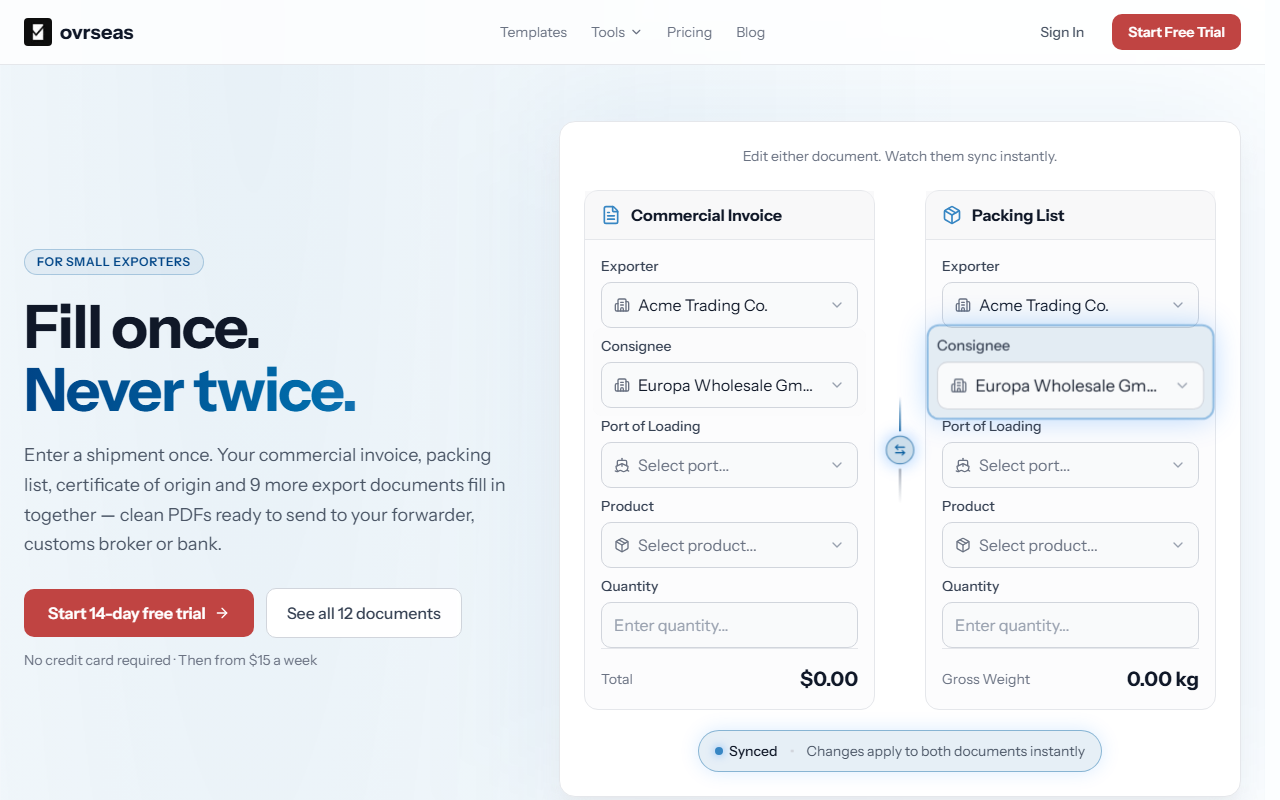
What it does not do: it does not file EEI in AES, it does not make dangerous goods declarations, and it does not check your HS codes or numbers for you. Each account has one login. Our site also has a free search of 13 US restricted-party lists, but it is a search tool, not a license decision.
What does ovrseas cost?
Start with a 14-day free trial. No card is needed, and you can make up to 30 documents. After that, pick the time you need:
1 week: $15, one payment. It never renews.
1 month: $20. It renews until you cancel.
1 year: $192, which is $16 a month.
Every paid option has unlimited documents. When your time ends, your documents, buyers and products stay in your account, and you can still view and download every PDF. See pricing.
Is Excel enough?
For one or two documents a shipment, a few times a year, yes. A spreadsheet starts to cost you when the same buyer, amount and carton count are typed into several files. That is where they drift apart. We wrote the full trade-off in Excel vs export documentation software. If you only need one blank form, our free commercial invoice template may be all you need.
Where are the side-by-side comparisons?
Frequently asked questions
Is there free export documentation software?
IncoDocs has a free plan for up to 10 documents a month. ovrseas has a 14-day free trial, not a free plan. If you only need one form, a free template may be enough.
Does export documentation software file my EEI?
Some tools do. Shipping Solutions and Descartes say they file EEI through AES. ovrseas does not. Your forwarder can also file it for you as your agent.
Do I need software if my forwarder makes my documents?
Maybe not. A forwarder often makes the bill of lading and files EEI. You still send the commercial invoice and packing list, and they must match each other.
Sources, read 12 October 2026: Shipping Solutions pricing, IncoDocs pricing, Cargoflip pricing, Descartes Export Documentation Manager, Just Trade export document software. ovrseas facts are from our pricing page and our product's plan limits.
Make the invoice and packing list match
Enter the shipment once. Quantities, packages and weights come out the same on the commercial invoice and packing list, with the fields customs asks for.
No credit card required · 14-day free trial

Related Articles
Mexico's Electronic Value Declaration Is Mandatory on 1 October — What Your Buyer Will Need From You
From 1 October 2026 your Mexican buyer files the customs value declaration electronically. Every input to that filing — invoice, contract, payment proof, Incoterm — comes from you.
CBP's Rail Export Manifest Rule: What Has to Be Right 24 Hours Before Departure
CBP's final rule for rail export manifests takes effect 26 October 2026. The initial filing is due 24 hours before departure, and six of its seven mandatory fields come off your own shipment documents.
EU Direct-Transport Proof (July 2026): What US Exporters Must Now Show
From 1 July 2026, US goods claiming the EU's adjusted duty treatment must prove direct transport. Here's the document-consistency check for small exporters.